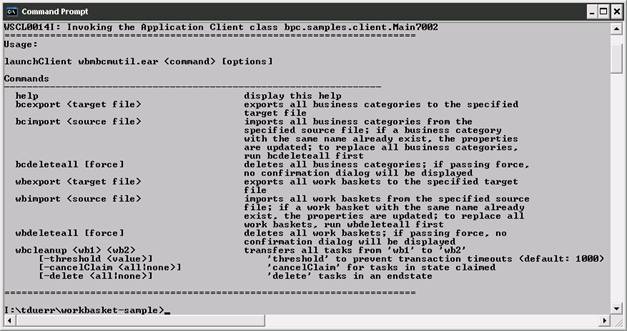
The commands of the sample client and their special behavior as well as the sample application with the task definition are reviewed in this section.
For the code review open the ‘bpc.samples.client.Main7002.java’ class. The class is part of the wbmbcmutil.ear file, which is available for download from the download section of this sample.
The client is a launchclient application which uses the BPC related EJB remote interface. It covers the following commands:
The export functionality is implemented at the ‘doWbexport()’ and ‘doBcexport()’ methods.
They are basically the same. ‘doWcexport()’ is reviewed here:

The steps are done in its own transaction (UserTransaction) controlled by the client.

In a first step a lookup of the HTM EJB
remote interface is done. The result is casted to ‘WorkBasketManagerService’ or
for BusinessCategory to ‘BusinessCategoryManagerService’ to get a shortened
view of the WorkBasket/BusinessCategory related methods.
Predefined Query Tables are used to execute WorkBasket and BusinessCategory related queries.
There is a predefined Query Table available for WorkBaskets (WORK_BASKET) and another for BusinessCategories ‘BUSINESS_CATEGORY’.
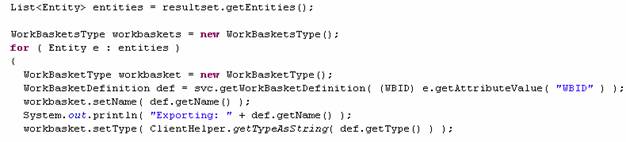
The next step is to copy all information from the BPC java instances (WorkBasketDefinition) to the generated JAXB proxy types (like ‘WorkBasketType’).
JAXB proxy classes are used to export the WorkBaskets or BusinessCategory definitions. The proxy classes are generated with the ‘xjc’ java tool from predefined schemas (WorkBasket.xsd and BusinessCategory.xsd). It is an elegant way to marshal (serialize) java instances to XML and vice versa (unmarshal).
This is done for each field. Some fields (like the type) are transformed from an int value to its corresponding string representation and back. This is not vital but makes the output more readable. The ClientHelper class implements this functionality.

Finally the WorkBaskets are marshaled (serialized) to the given file. A separate class (JAXBHelper) implements this functionality.
<?xml version="1.0" encoding="UTF-8" standalone="yes"?>
<workBaskets xmlns="http://samples/bpc/work-basket/">
<workBasket>
<name>WB1</name>
<type>TYPE_INDIVIDUAL</type>
<owner>Owner 1</owner>
<customText1>CustomText1</customText1>
<customText2>CustomText2</customText2>
<customText3>CustomText3</customText3>
<customText4>CustomText4</customText4>
<customText5>CustomText5</customText5>
<customText6>CustomText6</customText6>
<customText7>CustomText7</customText7>
<customText8>CustomText8</customText8>
<defaultQueryTable>DefaultQueryTable</defaultQueryTable>
[...]
</workbasket>
</workBaskets>
The picture shows the cutout of the output for an exported WorkBasket.
The methods ‘doWbimport()’ and ‘doBcimport()’ implement the logic to import the exported WorkBasket and BusinessCategory definitions. The ‘doWbimport()’ method is reviewed here.
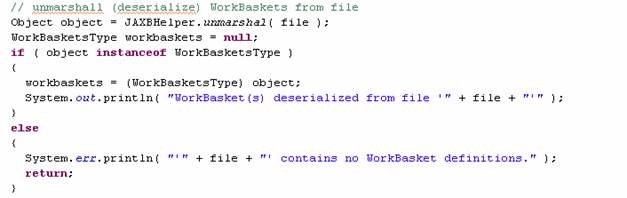
The given file that contains the XML content is deserialized (unmarshaled) using the already mentioned JAXB functionality. The class ‘JAXBHelper’ implements this step and returns an instance of the ‘WorkBasketsType’. If its no instance of this type an error is reported.
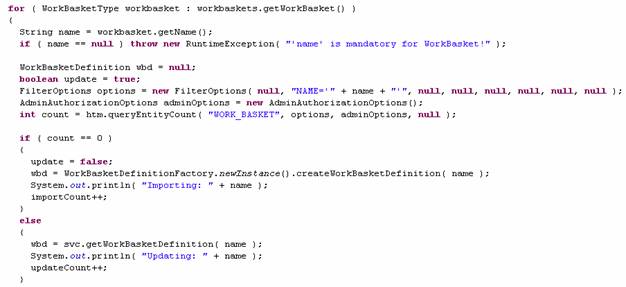
A check determines for each WorkBasket that the ‘WorkBasketsType’ is contained. If the WorkBasket already exists then it needs to be updated, if it does not exist a new ‘WorkBasketDefinition’ must be created. The ‘WorkBasketDefinitionFactory’ provides the support for a new ‘WorkBasketDefinition’.
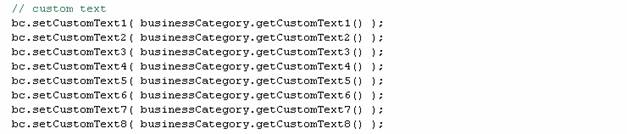
The next steps are the same as done for the export but in the other direction. All fields are copied by invoking the getter and setter methods. ‘bc’ is an instance of the type ‘BusinessCategory’ and ‘businessCategory’ an instance of the generated JAXB type ‘BusinessCategoryType’

Finally the ‘WorkBasketManagerService’ is called to update or create a WorkBasket.
The ‘doWbcleanup()’ method is a sample implementation of how a WorkBasket can be cleaned up. There are a few things to consider.
There are three optional parameters to set:
A first query via the query table API determines all affected task instances.
Then all task instances are sorted by their state. This is necessary for the correct behavior regarding the considerations described above.
For example, task instances in state:
‘doWbdeleteall()’ and ‘doBcdeleteall()’ delete all WorkBaskets and BusinessCategories. All WorkBaskets and BusinessCategories must be empty otherwise one cannot delete them. The structure of both methods is nearly the same as the already reviewed methods and therefore not explained any further here.
HumanTasks can be assigned to an existing WorkBasket by their initialization unless the ‘Work basket identifier’ is defined during modeling in the modeling process. In this sample a standalone to-do task is assigned to the WorkBasket ‘WB1’.
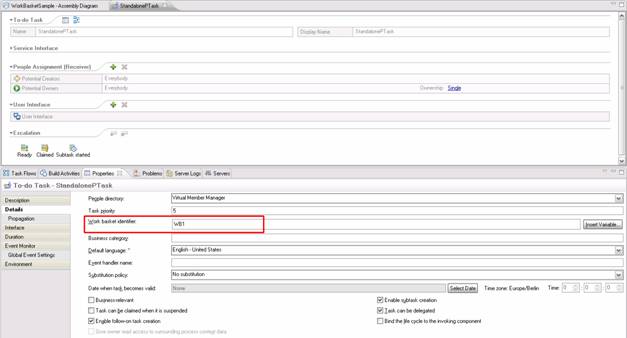
Another way to assign a task to a WorkBasket is to create the task and update the name of WorkBasket.