Create a Proxy Gateway
- Open WebSphere® Integration Developer in a new workspace.
- Select Window > Show view > Patterns Explorer to open the Patterns view, as shown in Figure 1.
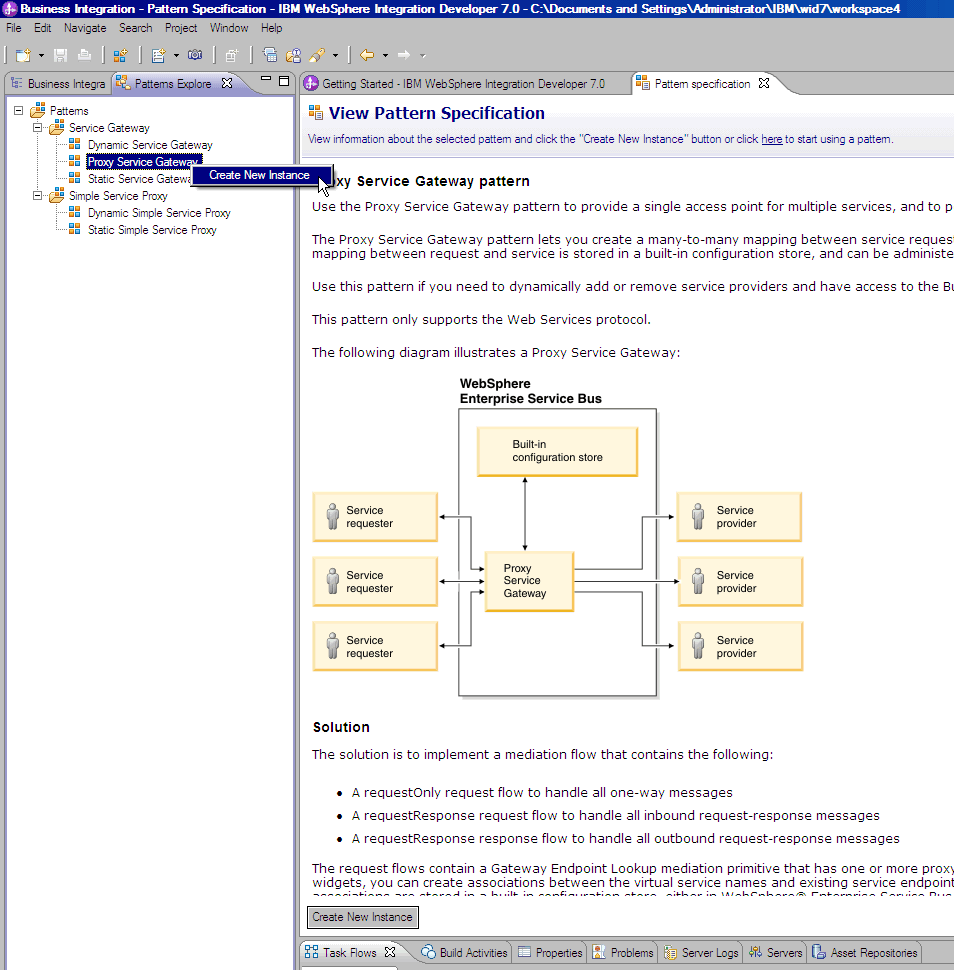
- Create a new Proxy Gateway in the Patterns Explorer tab. Right-click Proxy Service Gateway and select Create New Instance as shown in Figure 2.
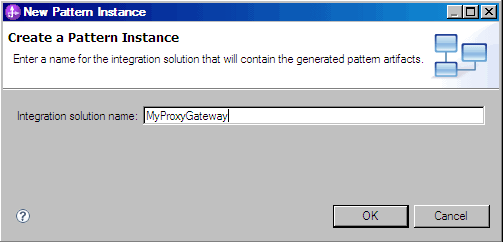
- Enter MyProxyGateway as the Integration Solution name and click OK. The New Pattern Instance panel opens, as shown in Figure 3.
- Accept the default configuration for the Proxy Gateway and click Generate. The Proxy Gateway wizard generates the required artifacts and a summary panel opens.
- Scroll down and click the requestResponse Request Flow diagram to open the Mediation Flow Editor. A single Gateway Endpoint Lookup primitive is created by default.
- Select the Gateway Endpoint Lookup Primitive. The panel should
similar to this:Figure 4. Route Message panel


The details section shows the Lookup Method selected (URL) and populates a default Proxy Group called MyProxyGateway ProxyGroup. When the application is installed, WebSphere ESB will check if MyProxyGroup exists. If not, WebSphere ESB will create a new Proxy Group within the built-in configuration store and create an association between the Proxy Gateway and Proxy Group.
When the application is removed from the runtime the association between the Proxy Gateway and Proxy Group is removed, but the Proxy Group configuration remains. You can redeploy the application without losing configuration information associated with the Proxy Group (such as Virtual Services).
You can delete the Proxy Group manually using the Business Space console, when there are no associated Proxy Gateways.
The generation of the Proxy Gateway is now complete and the mediation module can be deployed on the runtime environment.