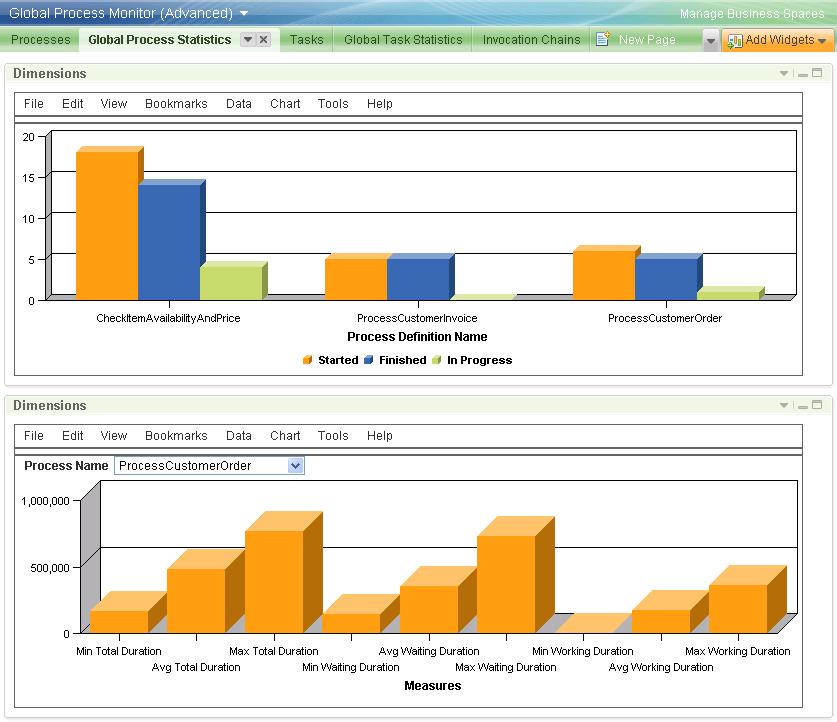
This page is meant for graphical visualizations of the data presented in tabular form on the Processes page. Two dimensional widgets have been pre-configured to give an example of the kind of graphs one can show. The dimensional models of the Global Process Monitor model are quite comprehensive, so that you can add a wealth of other diagrams according to your needs.
A snapshot of the preconfigured page, which is part of both the basic and the advanced dashboard configuration, is shown in Figure 10. The upper diagram displays the number of executions started, finished, and under way for three process definitions. The lower diagram shows statistics for the total duration, waiting duration, and working duration of the ProcessCustomerOrder process. Note that the process definition in focus is selected from the Process Name pull-down menu.
|
| Figure 10: Snapshot of the Process Statistics page |
The lower diagram in Figure 10 suggests that the bulk of the total process duration is due to human tasks waiting to be claimed—which is not surprising. Something that does surprise, however, is the very small (apparently zero) minimum working duration. It should be possible to explain this observation using the data gathered by this monitor model. The necessary steps are outlined below, as an example for how to resolve such questions using the Global Process Monitor.
First, by hovering over the Min Working Duration column in the graph, we see that the minimum working duration is not zero but 1.625 seconds. Switching to the Processes page, and drilling down to the Process Execution level for the ProcessCustomerOrder process, we find one execution whose working duration is indeed 1.625 seconds. Drilling down to its Process Execution Step view, we see a picture like Figure 11.
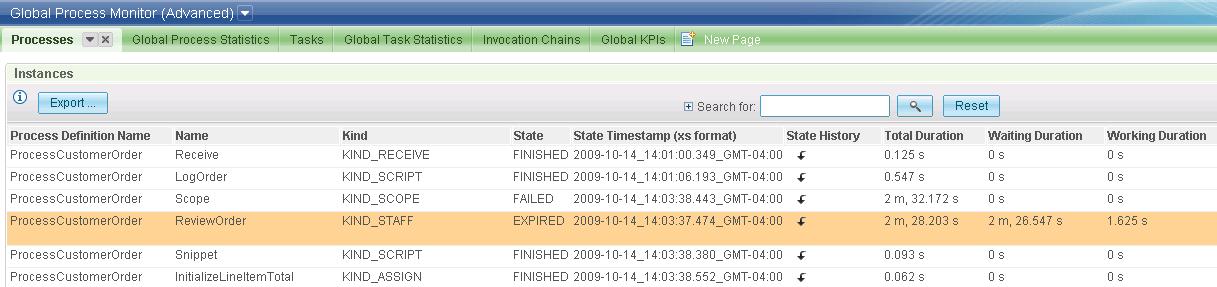 |
| Figure 11: The steps of the process execution that had a 1.625 seconds working duration |
A single human task has run (ReviewOrder) and was apparently completed within 1.625 seconds after it was claimed. This still seems too fast to be true. To explore this further, we drill down into the task's State History and what we find is shown in Figure 12: the task expired 1.625 seconds after it was claimed, and before the user had a chance to complete it.
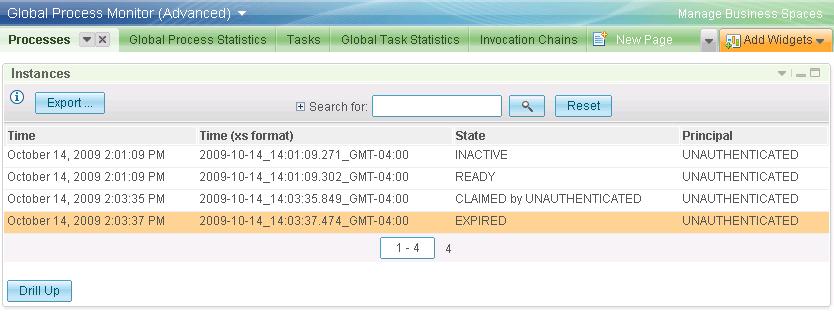 |
| Figure 12: The state history of a ReviewOrder task execution |