This sample demonstrates how you can create a WebSphere® Web application which accesses the Web service API delivered with the WebSphere Business Process Choreographer. This API is available both for the Business Flow Manager and the Human Task Manager.
Sample Application Structure
In this sample, all steps are shown that are required in order to generate the proxy and to set up the Web application properly.
First, this sample demonstrates exactly one operation of the BFM Web service API in depth, namely the operation to list all Business Process Templates on the server.
Second, this sample shows the coding needed to assemble a business object, create an input message, start a long running process, and then query its state and display its output. The usage of the other operations and the usage of the Human Task Manager Web service API can be derived by analogy.
The Web application in this sample is implemented as Java code (Java Server Page). It accesses the Web service interface through a Java proxy which renders the Web service operations as Java interface. Figure 1 outlines the structure of the sample.
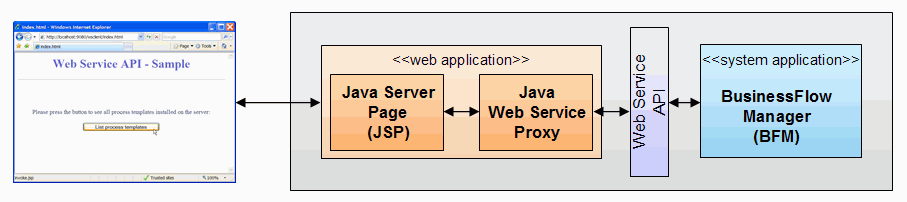 |
| Figure 1: Sample application |
Security aspects
The Web service API delivered with the WebSphere Business Process Choreographer is secured by the Web service's security mechanism. This means that all requests against this Web service's interface have to contain a security token, which represents a valid user authentication. There are several types of security tokens. In this sample, LTPA (Lightweight Third-Party Authentication) is used as authentication mechanism and an LTPA token is passed to the Web service's interface. As a prerequisite, the Web application has to be secured as well, i.e. we have to make sure that authentication is required by our Web application. In the "Build it Yourself" section, all the steps how to secure a Web application, how to have the application generate an LTPA token and pass it to the Web service's interface are described in detail.
Multi-Server scenario
It is possible to run the client application and the Business Flow Manager on different servers. An example configuration consisting of a WebSphere Process Server Client running on WebSphere (Server A) and a WebSphere Process Server (Server B) is shown in figure 2.
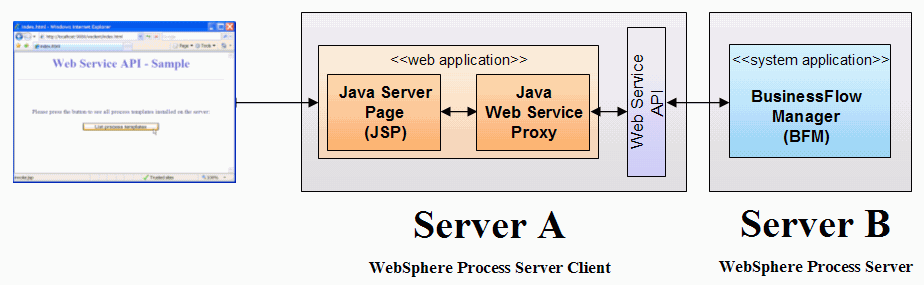 |
| Figure 2: Multi-server scenario |
Note that in this scenario single sign-on must be established between server A and server B, to make sure that the
LTPA token created by server A is accepted as well by server B.
For more details about setting up single sign-on refer to
the InfoCenter: Single sign-on documentation.