A participating task is a component in a SCA module. Basically, there are three ways to invoke a participating task:
- Invocation from outside the SCA module (export)
- Invocation from a component inside the same SCA module (wiring)
- Invocation by a custom client application using the task API
The first two ways ways will be discussed shortly. The third way will be illustrated with code snippets.
SCA export
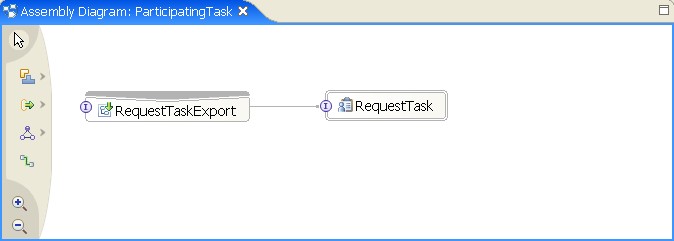
You can make a participating task available outside the SCA component by exporting the interface. You can choose different bindings like SCA or SOAP. To export the interface, add an export to your SCA module. The preferred interaction style of the participating task is asynchronous. The following diagram shows how the participating task is exported with a SCA binding:
SCA component
If you want to invoke the participating task from components inside your SCA module, you can add a wire from these components to the participating task component. Note that the participating task has a preferred interaction style of asynchronous and a join transaction qualifier of false. BPEL processes that invoke participating tasks should be defined as long-running processes. Additionally the asynchronous nature of the participating tasks should be considered, when the BPEL process is modeled. The following diagram shows the wiring from a BPEL process to the participating task.
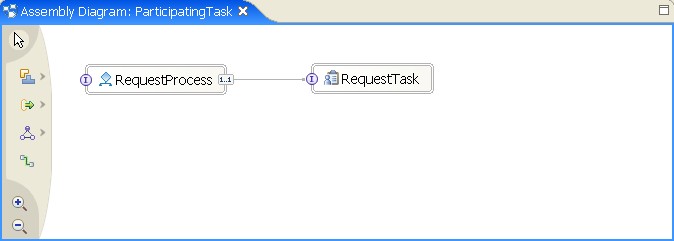
The ParticipatingTaskApp in the download section of this sample contains a simple BPEL process that calls the participating task.
Task API
If you invoke a participating task through the task API, you do not need to export or wire the task component.
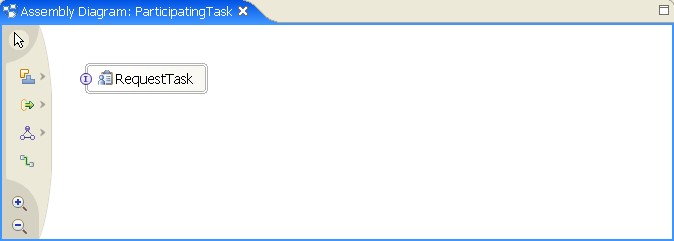
The next sections show the basic API commands, that you can include in your application to invoke participating tasks.
Java libraries
The required Java classes and interfaces can be found in the following package:
HumanTaskManager EJB
The key access point is the HumanTaskManager EJB. The following sample code shows how to create the local HumanTaskManager EJB:
LocalHumanTaskManagerHome taskHome = (LocalHumanTaskManagerHome)context.lookup("java:comp/env/ejb/LocalHumanTaskManagerHome");
LocalHumanTaskManager taskManager = taskHome.create();
Starting tasks
The first step is to create a new task. Provide task name and namespace:
With the task instance identifier returned by the createTask operation, you can obtain the task instance:
Before you can start the task, you have to provide the task input message. The Input message is a commonj.sdo.DataObject wrapped in a ClientObjectWrapper. A pre-initialized ClientObjectWrapper can be obtained from the task instance:
commonj.sdo.DataObject inner = (DataObject)cow.getObject();
inner.setString("question",request.getParameter("task_question"));
Note: Only the top-level DataObject is created implicitly by the ClientObjectWrapper. If the task input message is of a complex type, you have to explicitly create the nested DataObjects before setting parameters.
After you have composed the task input message, you can start the task. Provide the task instance identifier and the task input message. If you want to use a custom reply handler, you can pass your own implementation as third parameter:
After the task has finished, you can access the task output message. The task output message is also wrapped in a ClientObjectWrapper:
DataObject inner = (DataObject)resp.getObject();
answer = inner.getString("answer");
Querying tasks
Before you can work with a participating task, you have to retrieve a particular task instance from the internal task database. To retrieve task instances, the task API offers powerful query capabilities. To obtain the task instances of a particular task template, issue the following query:
String whereClause = "TASK_TEMPL.NAME='RequestTask' AND TASK_TEMPL.NAMESPACE="http://ParticipatingTask/bpc/samples";
QueryResultSet instances = taskManager.query(selectClause, whereClause, null, null, null, null);
The returned QueryResultSet contains the task instance identifiers. You can iterate the QueryResultSet using the following operations:
b = instances.next();
To get the task instance, issue the following commands:
Task task = taskManager.getTask(tkiid);
For a more detailed description of the query capabilities, refer to the InfoCenter.
Deleting tasks
If a task is in one of the states inactive, terminated, expired, finished, or failed, you can delete a task instance:
Prepare your web application
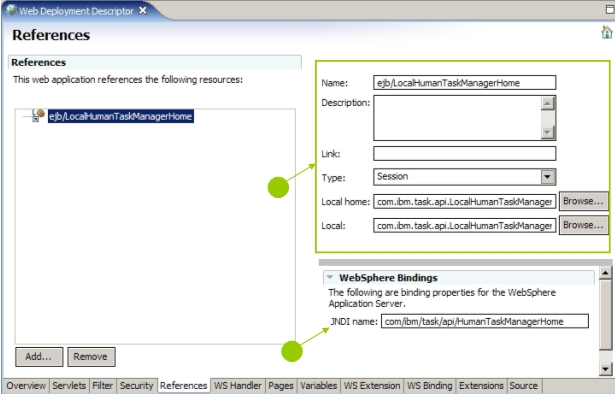
Add a reference to the local session bean to the web deployment descriptor. The relevant elements of the deployment descriptor are shown in the following XML fragment:
<ejb-ref-name>ejb/LocalHumanTaskManagerHome</ejb-ref-name>
<ejb-ref-type>Session</ejb-ref-type>
<local-home>com.ibm.task.api.LocalHumanTaskManagerHome</local-home>
<local>com.ibm.task.api.LocalHumanTaskManager</local>
</ejb-local-ref>
To add a EJB reference binding, complete the following steps:
- Switch to the deployment descriptor editor of your web application.
- Click the References tab.
- In the JNDI name field, enter the reference binding.
The following screenshot shows the reference binding of the web deployment descriptor in WebSphere Integration Developer: