Data preparation
In the SCA programming model, data are exchanged via business objects. You can define these business objects as XSD types. In your Java application, e.g. a JSP, you use the class commonj.sdo.DataObject as the representation of business objects.
The business process of this sample uses two business objects: DataIn for input data, and DataOut for output data. Before calling the process, the application has to define the input business object, after the call, the output business object is returned to the application.
When you take a look at the definition of the interface SimpleProcessInterface.wsdl and the business Object DataIn.xsd, you will recognize that DataIn and DataOut are wrapped in a message elements, which are in turn business objects, too. You have to consider this structure, when you create business objects for your process.
The following picture shows the structure of the business objects and outlines how you can create the corresponding commonj.sdo.DataObjects:
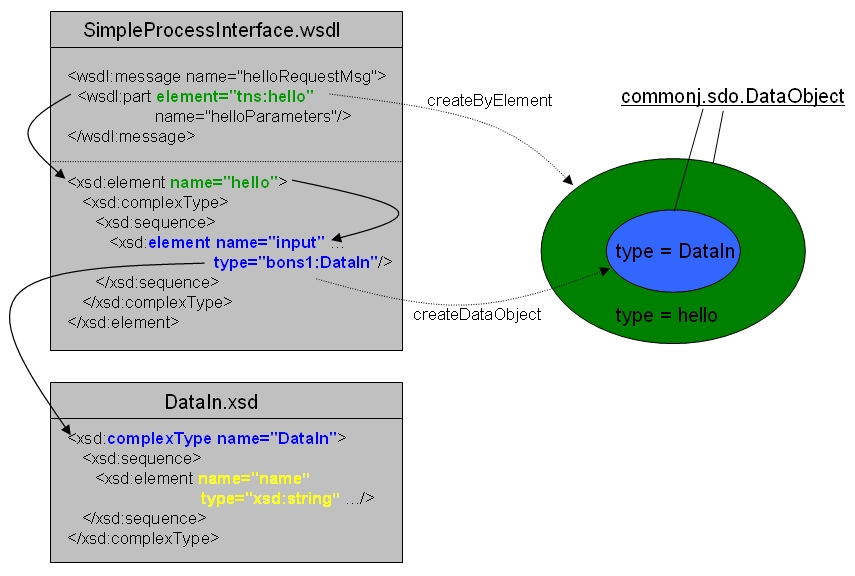
Since this sample uses a JSP to invoke the business process, the first step is to create the input business object as commonj.sdo.DataObject. The type of that business object is the type of the input message as defined by the the process interface. So, two commonj.sdo.DataObjects have to be created: an outer business object of type XSD element hello, and an inner one of XSD type DataIn.
The following Java code snippets show how you can create the input business object .
First, you need an instance of com.ibm.websphere.sca.ServiceManager that will help you to access the services you need.
ServiceManager manager = new ServiceManager();
Create the outer commonj.sdo.DataObject:
BOFactory factory = (BOFactory)manager.locateService("com/ibm/websphere/bo/BOFactory");
DataObject Input = factory.createByElement("http://SimpleProcessLibrary/bpc/samples/SimpleProcessInterface","hello");
After creating the outer commonj.sdo.DataObject, you have to create the inner one. Finally, assign data values to the business object:.
Input.createDataObject("input");
Input.getDataObject("input").setString("name", "value");
Now, you are ready to invoke the process.
Process invocation
First, locate the service that represents the business process. Since the business process is defined in a separate module, we use a service reference to call this business process. The argument of the locateService method is the name of the standalone reference, that is defined in the SCA module that imports the SCA service from the process module.
Service process = (Service)manager.locateService("SimpleProcessInterfacePartner");
After that you can invoke the process and save the business object, that is returned by the business process. The first argument is the operation, you want to invoke, the second argument is the input business object.
DataObject Out = (DataObject)process.invoke("hello",Input);
From this business object you can now extract the values and present it in the way you prefer.
String resp = Out.getDataObject("output").getString("result");
Click on the links to explore the complete source code of the JSP and the HTML input page.