Code review

Learn how to define event handlers using WebSphere Integration Developer.

Defining 'on event' event handlers for a scope

To define an 'on event' event handler, you have to specify a message. In this sample, correlation is defined for the message. The following BPEL snippet shows the 'on event' event handler for this sample. The implementation of the event handler is enclosed in a sequence activity.

JobPostingProcess.bpel:

<bpws:scope name="Scope" ...>
   <bpws:eventHandlers>
      <bpws:onEvent messageType="ns0:applyRequestMsg"
                    operation="apply"
                    partnerLink="Client"
                    portType="ns0:JobPostingSystem"
                    variable="Application">
         <bpws:correlations>
            <bpws:correlation initiate="no" set="JobOfferingNumber"/>
         </bpws:correlations>
         <bpws:sequence name="HiddenSequence1" ...>
            <bpws:invoke name="AddApplicationToList" ...>...</bpws:invoke>
            ...
         </bpws:sequence>
      </bpws:onEvent>
   </bpws:eventHandlers>
</bpws:scope>

Defining 'timeout' event handlers for a scope

To define a 'timeout' event handler, you have to specify a time event, and optionally a repeating time event. The following BPEL snippet shows the 'timeout' event handler for this sample. Note that the timer event is specified in Java code, so it is not shown here. The invoke activity illustrates the implementation of the event handler.

JobPostingProcess.bpel:

<bpws:scope name="Scope" ...>
   <bpws:eventHandlers>
      <bpws:onAlarm>
         <bpws:for>...</bpws:for>
         <bpws:repeatEvery>...</bpws:repeatEvery>
         <bpws:invoke name="ReportNumberOfApplications" ...>...</bpws:invoke>
      </bpws:onAlarm>
   </bpws:eventHandlers>
</bpws:scope>

Defining event handlers using WebSphere Integration Developer

The next two sections describe how to define an 'on event' event handler and a 'timeout' event handler.

Defining 'on event' event handlers

To add an 'on event' event handler to a scope, perform the following steps:

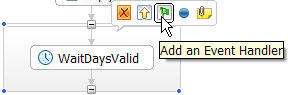
  1. In the business process editor, click the scope, then click the Add event handler button .
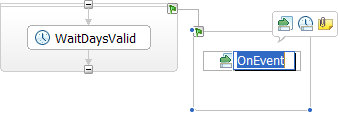
  2. The event handler is added:

  3. In the event handler, click OnEvent.
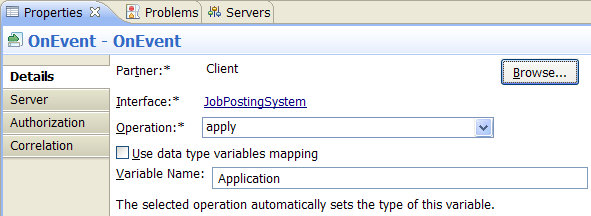
  4. Go to the Properties view and select the Details tab.
  5. To select an interface partner, click Browse. The Select a Partner window opens.
  6. Select the matching partner, then click OK. The window closes.
  7. Select the appropriate operation in the field next to Operation.
  8. Deselect the option Use data type variables mapping.
  9. In the Variable Name field, enter a name for the variable. The variable type will be set automatically to the type of the WSDL message.
  10. On the toolbar, click the Save button .

Defining 'timeout' event handlers

To add a 'timeout' event handler to a scope, perform the following steps:

  1. In the business process editor, expand the event handler in case it is collapsed. If no event handler was defined, create an event handler.
  2. Right-click the event handler.
  3. From the pop-up menu, select Add a Timeout Element.
  4. The on alarm event handler is added:

  5. In the event handler, click Timeout.
  6. Go to the Properties view and select the Details tab.
  7. Select an Expression language.
  8. Specify the appropriate expression.

    Note: For more detailed information about expressions, refer to the information center.

  9. On the toolbar, click the Save button .
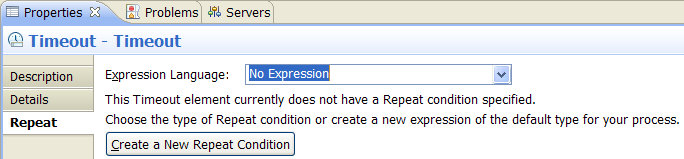
To add a repeating timeout to your on alarm event handler, perform the following steps:

  1. In the business process editor, click Timeout.
  2. Go to the Properties view and select the Repeat tab.
  3. Select an Expression language.
  4. Specify the appropriate expression.
  5. On the toolbar, click the Save button .