The custom JSF client sample demonstrates how you can create a custom user interface for a specific business process and its human tasks.
Structure of the sample
The sample consists of a Web application with the custom client and a business process, on which the custom client operates. The sample business process is a simplified order management process. Figure 1 outlines the structure of the sample.
 |
| Figure 1: Sample applications |
Web application
Other than the BPC Explorer, which offers a generic user interface to all kind of business processes and human tasks, the custom JSF client is tailored to the specific needs of the order management process. Generic features, which are not needed for the order management process, are left out while others, such as custom properties for process instances, are added. Although many of the components of the BPC Explorer are re-used by the custom client, the GUI presented to the users is very different from the BPC Explorer.
The custom JSF client allows to start an order management process, list active process instances, and to query and work with the process' staff activities. The features of the custom client are shown in detail in the Run the Sample section.
Building blocks of the custom client
The custom JSF client is assembled as a set of HTML and JSP pages. The JSP pages use standard Java Server Faces (JSF) components, as well as JSF components provided by the BPC Explorer. These BPC Explorer components operate on the BPC client model, which was extended with custom items and queries. Figure 2 shows the internal structure of the custom JSF client Web application. The orange items show custom elements.
 |
| Figure 2: Internal structure of the custom JSF client |
Order management process
The order management is a sample business process for the internal management of outgoing orders. The business model behind this process is that orders in a company have to be accepted by an accounting clerk. If the size of the order is above 10'000, an additional approval step is required. If the order contains errors, the order data is presented to a co-worker in order to correct the wrong data. If the co-worker signals that the errors cannot be corrected, the process returns an error. Each step in the process, e.g. the approval or the decision, is written to an audit trail. The process returns the output message, this audit trail together with the state of the order, which indicates whether the order has been accepted, rejected or failed. Figure 3 shows the order management process.
|
|
 This loop is processed as long as the order is not in a final state. Final states are accepted, rejected, or failed. Besides the final states, the states initial, approve, and error are used in the process. Internally, these states are stored in a process variable of type integer.
 The state of the order is modified using staff activities. In case of an error, the UpdateOrder activity allows a user to modify the order data. For an improved presentation, custom JSPs are specified for these staff activities.
  The UpdateState activities evaluate the input that was received from the staff activities and update process variables accordingly. Furthermore, these modifications are written to an audit trail.
  A timeout can be specified in the staff activities so you can pause the process for a certain time period.
Interfaces of the process and the staff activities:
Business objects used by the order management process:


Order management interface:

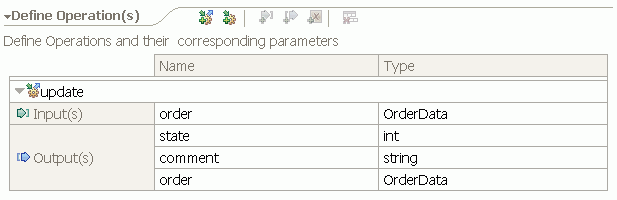
Update state interface as implemented by the staff activities Decide and Approve:
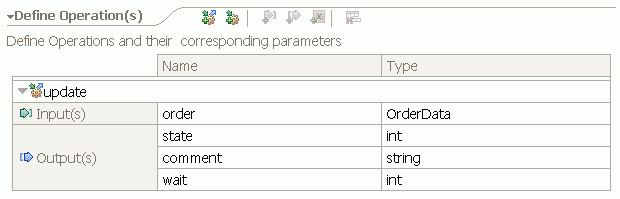
Update order interface as implemented by the staff activity UpdateOrder: