The JMS sample shows how you can invoke a business process from a J2EE application using Java Message Service.
Structure of the sample
The JMS sample consists of three components: a library, a business process in an SCA module and a J2EE enterprise application. The applications depend on JMS resources, such as queues, destinations, etc. Before you can run the sample application, you have to create these resources on your WebSphere Process Server. The following image shows the structure of the sample:

The components are explained in the next sections.
Library
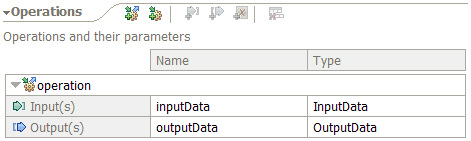
The data types and the process interface are defined in the JMSSampleLibrary. A dependency to the library is added to the process module, and the library is imported to the client application. See the following images for the data types and the interface:
Data types:
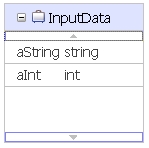
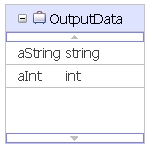
JMSSample interface:
Process module
The process module JMSSampleModule provides the business process and the export component with a JMS binding. The preferred interaction style of the process component is specified as "Asynchronous". The following assembly diagram shows the components of the JMS sample module:

The JMS sample process is implemented as long-running business process. It has a single Java snippet activity which reads the input data, modifies the values and writes the modified values to the output data. The following image shows the business process:
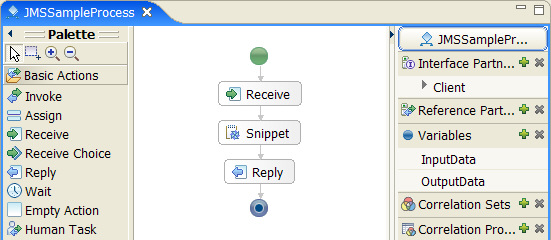
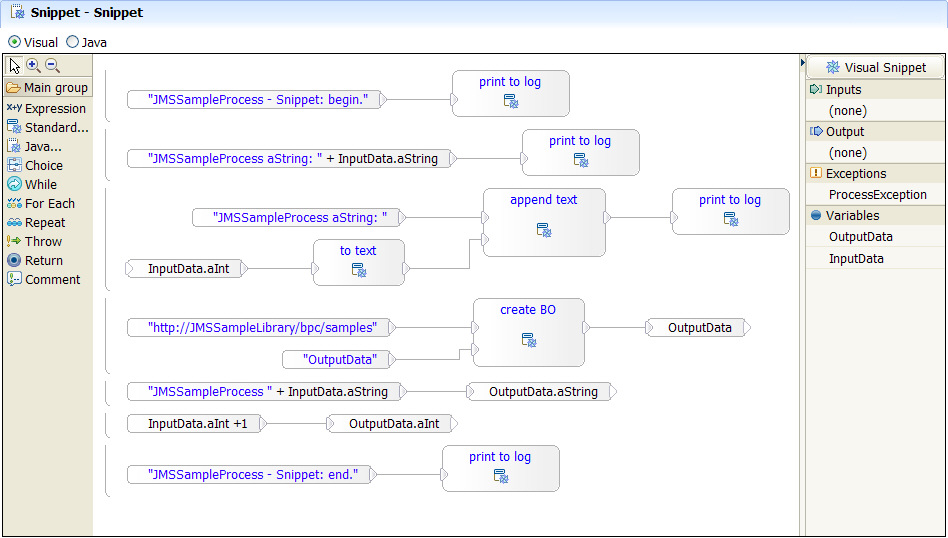
The Java snippet activity prints the values of the input variables to the SystemOut.log, then it initializes the output variable and assigns values to the output variable. The following image shows the visual implementation of the Java snippet:
Client application
The client application provides a user interface to enter process input data and to display the process output in a browser. The code to invoke the process is encapsulated in a "business layer", which is packed in a utility project. The business layer calls the BO/SCA API to create the data objects required for the process invocation and the JMS API to invoke the process. The following picture outlines the structure of the client application:

Resources on WebSphere Process Server
To run the sample, you have to define the required JMS resources on WebSphere Process Server. For the sample, three destinations of type "Queue" are required in the SCA application bus: JMSSample, JMSSampleReply and the JMSSampleCorrelation. The last one is an internal destination required by the SCA infrastructure. This sample uses the default messaging provider delivered with WebSphere Process Server. In the server scope three queues are required: JMSSample, JMSSampleReply and JMSSampleCorrelation. The first queue is used by the client application to send a message to the process application, the second one to read the result. The third queue is used internally by the SCA framework. Furthermore, a queue connection factory and an activation specification are required. The queue connection factory, JMSSampleReplyQCF, is used to create connections to the associated JMS provider. The activation specification, JMSSampleAS, is associated with the (internal) message driven bean of the SCA module. For further information on how to create these resources, see the Build it Yourself section of this sample.